Content Overview

Download Package File Details

  • Free stock photos from Unsplash
  • Unique imagery from NothingToChance
  • High-quality free photos from Gratisography

Getting Started Quickly

Note: This is not a WordPress theme, and it wont install like a WordPress theme, this is a HTML5 template (static website).

Softar is a Responsive Software Landing Page HTML5 Template that comes with 10+ pages and 5 home page variations. Softar is a graphically polished, interactive, easily customizable, highly modern, fast loading, search engine optimized, efficiently coded, well documented, vibrant and fully responsive HTML5 and CSS3 Software Landing Page template specifically for , software , start-ups and mobile apps, Automotive site or your just a Blog

To edit this template with your info you will need a code editor, i use Sublime Text (http://www.sublimetext.com/3) and a browser i recommend to use Google Chrome.

It is really easy to use. There is multiple home page layouts to chose, also various selection of pages that you can use to create your website, but you can also create your own page layouts very easily (just copy and paste code form the elements examples).

When you start editing the template with your info is good idea to create separate folder, copy the assets folder and 404.html page there, rename one of the index... files to index.html and then move and edit pages that you will use. Also is good practice to create separate styleseet for your edits and load it bellow Softar CSS.

Deployment and Installation

Follow the steps below to setup your site template:

  1. Extract the downloaded archive and open the 'HTML' folder to find all template files. You will need to upload these files to your server via FTP for website use.
  2. The following is the folder structure to be uploaded to your website's root directory: HTML/css - Stylesheet files HTML/fonts – Icon font files HTML/img - Image files HTML/js - JavaScript files
  3. You can upload all or part of the HTML files as needed.
  4. All set! Begin adding your content and images to create a fantastic new website for your users.

Page Structure Explained

HTML File Structure Overview

Once you download the template, you can see a folder with several files and sub folders. You can read description of some important files in continue.

  • assets
    • css
      • Animation Effect CSS
      • Navigation Bar CSS
      • Bootstrap Core CSS
      • FontAwesome Icons CSS
      • Themify Icons CSS
      • Modal Window CSS
      • Owl Carousel Core CSS
      • Owl Carousel Theme CSS
      • Responsive Layout CSS
      • Minified and combined version of all essential CSS files
    • Fonts
    • Storage area for image assets, including logos, supplementary images, and videos.
    • js
      • Navigation Bar JavaScript
      • Bootstrap Core JavaScript
      • JavaScript for dynamic row height adjustment
      • Dynamic filtering with MixItUp
      • Animated elements with jQuery Appear
      • Smooth animations via jQuery Easing
      • Interactive image lightboxes with Magnific Popup
      • Core jQuery library integration
      • Feature detection with Modernizr
      • Responsive carousels using Owl Carousel
      • Engaging animations with WOW.js
      • Visual progress indicators
      • Masonry and dynamic layouts with Isotope
      • Reliable image loading detection
      • Animated number counters with CountTo
      • Collection of essential utility plugins
      • Custom scripting and enhancements
  • Home
  • Homepage Layout Two
  • ...
  • Stylesheet Resources

Customization

Please Read the Following Information Carefully

Softar follows a simple and easy to customize coding structure. Here is the sample for your reference:


<!DOCTYPE html>
<html lang="en">
  <head>
    <title>Softar - Software Landing Page Template</title>

    <!-- ========== Start Stylesheet ========== -->
    <link href="assets/css/bootstrap.min.css" rel="stylesheet">
    <link href="assets/css/font-awesome.min.css" rel="stylesheet">
    <link href="assets/css/themify-icons.css" rel="stylesheet">
    <link href="assets/css/magnific-popup.css" rel="stylesheet">
    <link href="assets/css/owl.carousel.min.css" rel="stylesheet">
    <link href="assets/css/owl.theme.default.min.css" rel="stylesheet">
    <link href="assets/css/animate.css" rel="stylesheet">
    <link href="assets/css/bootsnav.css" rel="stylesheet">
    <link href="assets/style.css" rel="stylesheet">
    <link href="assets/css/responsive.css" rel="stylesheet">
    <link href="style.css" rel="stylesheet">
  </head>
  

  <body>

    <!-- Start Navigation -->
    <nav class="navbar navbar-default navbar-fixed white no-background bootsnav">

    </nav>
    <!-- End Navigation-->


    <!-- Start Main
    ============================================= --->
    <main>

    </main>
    <!-- END Main Content -->


    <!-- Star Footer
    ============================================= -->
    <footer>

    </footer>
    <!-- End Footer -->


    <!-- jQuery Frameworks
    ============================================= -->
    <script src="assets/js/jquery-1.12.4.min.js"></script>
    <script src="assets/js/bootstrap.min.js"></script>
    <script src="assets/js/jquery.appear.js"></script>
    <script src="assets/js/jquery.easing.min.js"></script>
    <script src="assets/js/jquery.magnific-popup.min.js"></script>
    <script src="assets/js/modernizr.custom.13711.js"></script>
    <script src="assets/js/owl.carousel.min.js"></script>
    <script src="assets/js/wow.min.js"></script>
    <script src="assets/js/progress-bar.min.js"></script>
    <script src="assets/js/isotope.pkgd.min.js"></script>
    <script src="assets/js/imagesloaded.pkgd.min.js"></script>
    <script src="assets/js/count-to.js"></script>
    <script src="assets/js/bootsnav.js"></script>
    <script src="assets/js/custom.js"></script>

  </body>
</html>

Font Style Adjustments

How to change logo

世界杯半决赛最新消息

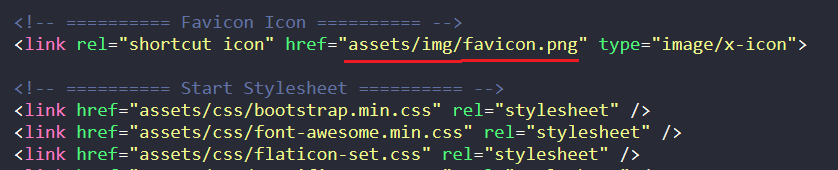
How to change favicon

Thumb

How to change page title

Thumb

How to Change Banner Text & Background

Banner One

Thumb

Banner Two

Thumb

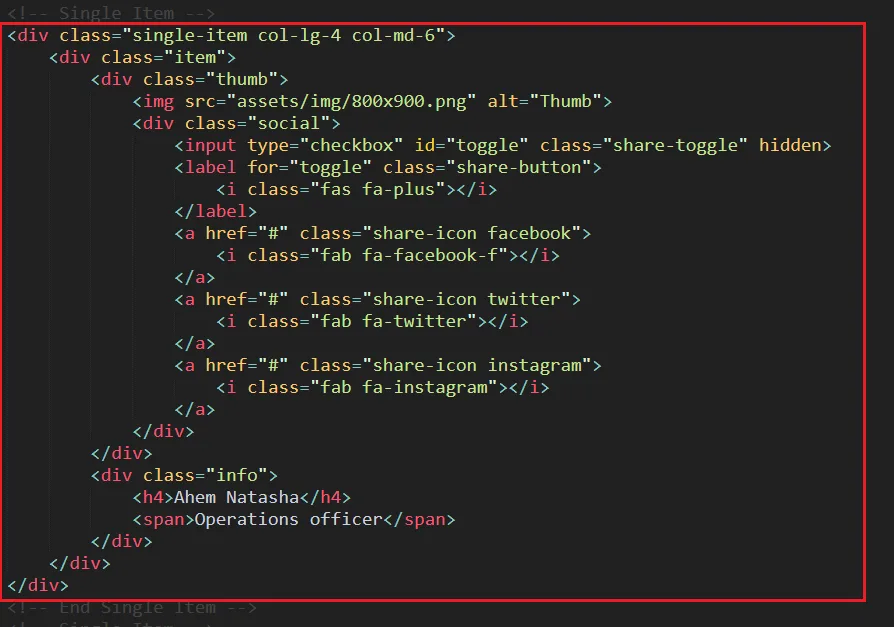
How to change Team Section

Thumb

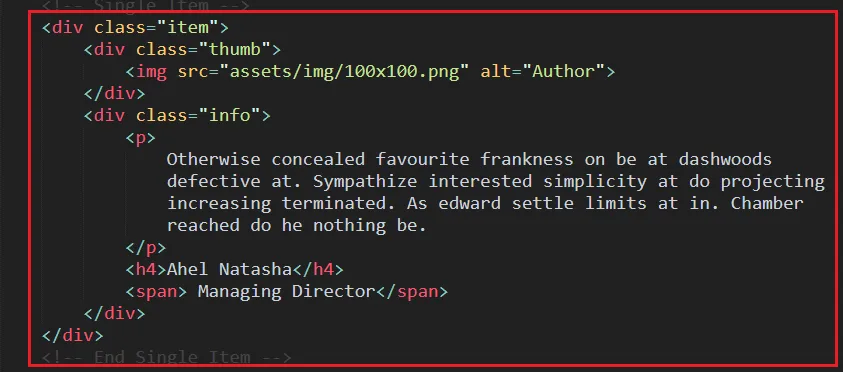
How to change testimonial Section

Thumb

How to Change Breadcrumb

Thumb

How to Add/Remove Footer Bottom

Thumb

How to change contact form email

Thumb

How to control Fun Factor

Thumb

How to control Owl Carousel

Thumb

How to control Preloader

Thumb

How to Add/Remove CSS

Thumb

How to Add/Remove JS

Thumb

Important Notes

This site utilizes two fonts from the Google Fonts library: Manrope and Roboto. You can modify them using the following code.

 @import url('https://fonts.googleapis.com/css2?family=Manrope:wght@200;300;400;500;600;700;800&display=swap');
 @import url('https://fonts.googleapis.com/css2?family=Roboto:wght@100;300;400&display=swap');
                    

Support & Resources

Read The following information Carefully

  • The fonts used on this site are sourced from Google Fonts. If you experience issues with default font display due to a lack of internet connection, this is expected behavior.
  • If the documentation provided is insufficient for your customization needs, please contact [email protected] for assistance.
  • Before requesting support, please verify that you are a legitimate purchaser of this content. Proof of purchase can be provided through one of the following methods: 1. Submit a support ticket including your purchase receipt. 2. Provide a screenshot of your purchase history within your account dashboard for download authorization confirmation.

credits

We extend our gratitude to all the resources that contributed to this site, collectively forming our exceptional sports news platform.

Images and video

  • Unsplash
  • NothingToChance
  • Gratisography
  • Discover free, high-resolution images on Magdeleine
  • Vast collection of free stock photos from Picjumbo
  • Explore stunning free images on Picography

JS Libraries

  • The foundational JavaScript library
  • Ensuring compatibility with modern web standards
  • Advanced browser feature detection
  • Sophisticated animation easing functions
  • Implementing smooth scrolling effects
  • Triggering animations on element visibility
  • Navigation bar enhancements
  • Adding dynamic entrance animations
  • Animating numerical counters
  • Creating beautiful image galleries
  • Achieving equal height columns
  • Building responsive image sliders

CSS & Fonts

  • Utilizing the Bootstrap framework
  • Enhancing user experience with motion
  • Extensive icon library
  • Modern and versatile icon sets
  • Curated web font collection
世界杯半决赛最新消息 Technology Co., Ltd.Quality you can rely onPhone:+86 159 4261 1741Email:[email protected]No. 481 Jianguo Road, Chaoyang District, Beijing